Plan your day.
Hit every deadline.
Taskr is a task manager built around deadlines: drag-and-drop lists, live countdown timers, recurring tasks, markdown notes and time tracking — in one workspace, on desktop and Android.
- €0 to start · no credit card
- Works offline
- Installable on desktop & Android
- Hosted in the EU

Everything you need to hit deadlines
The board does the scheduling, the counting down and the record keeping — no plugins, no second app to keep in sync.
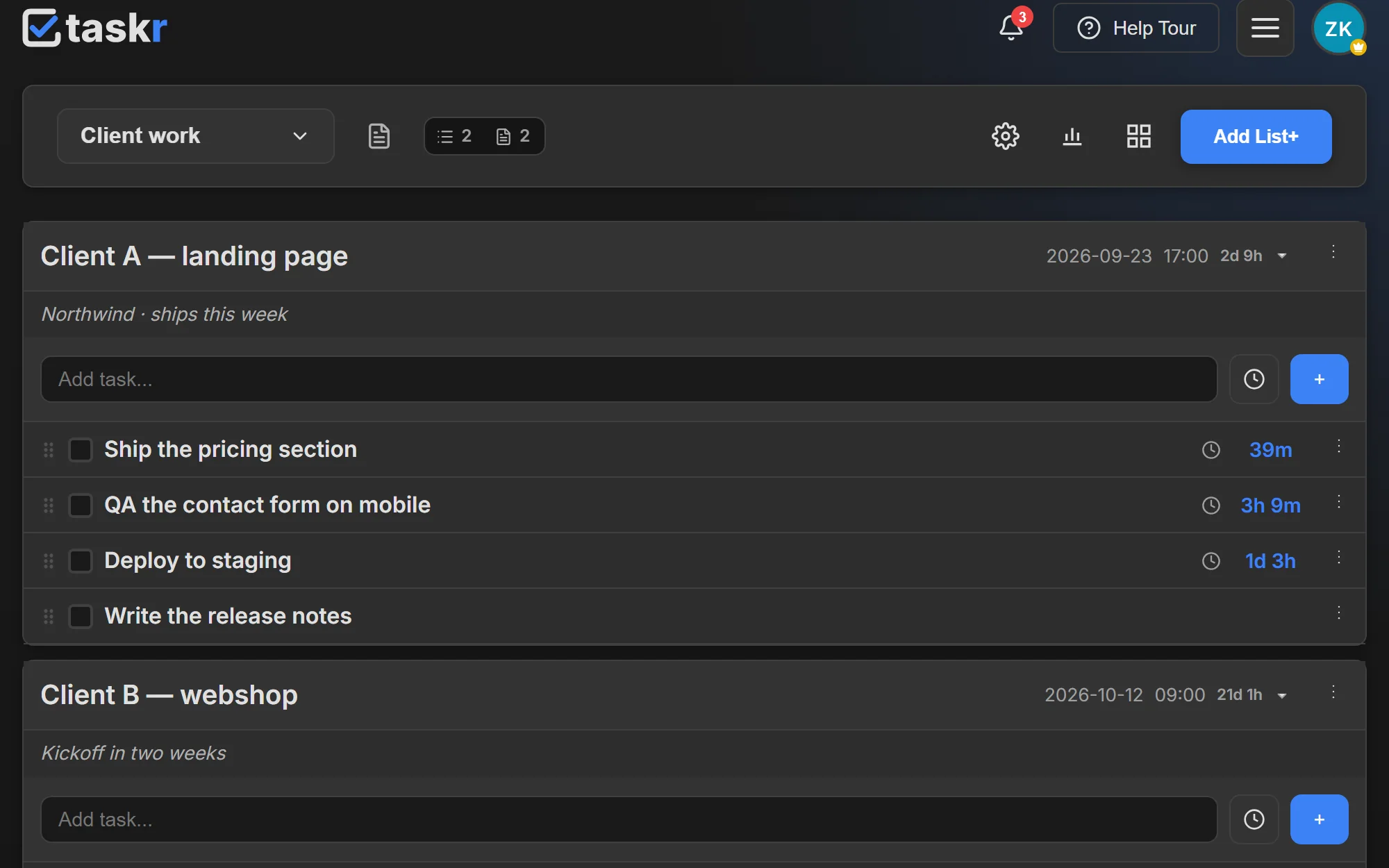
Every deadline, counting down
Set a date and a time on a task or a whole list and the countdown runs live — days, hours and minutes, turning orange then red as it closes in. What is due soonest floats to the top of the list.
How countdowns work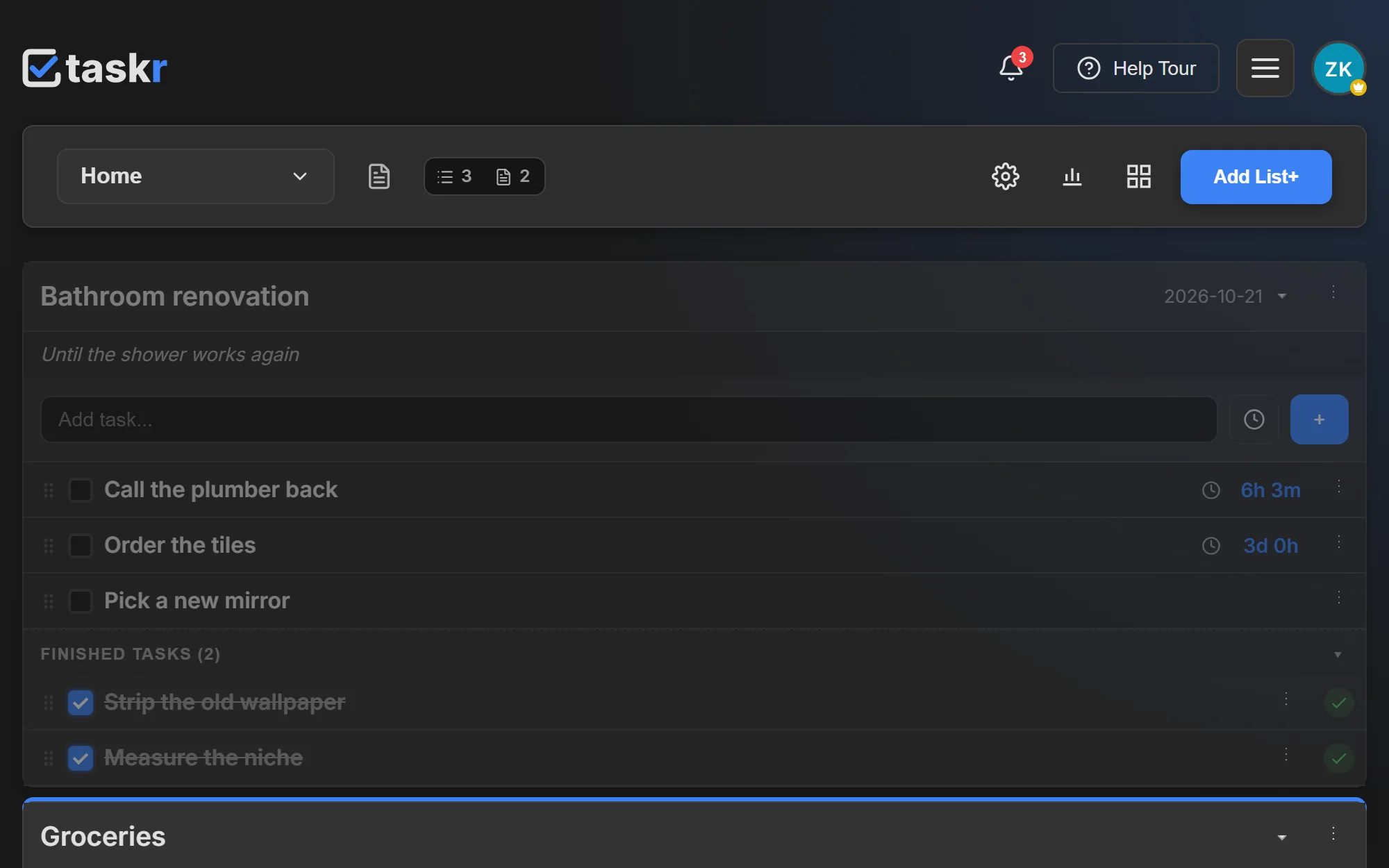
Arrange the board by dragging
Drag whole lists into the order that matches your day, and keep undated tasks in the order you give them — the board never reshuffles those behind your back.
How the board is arranged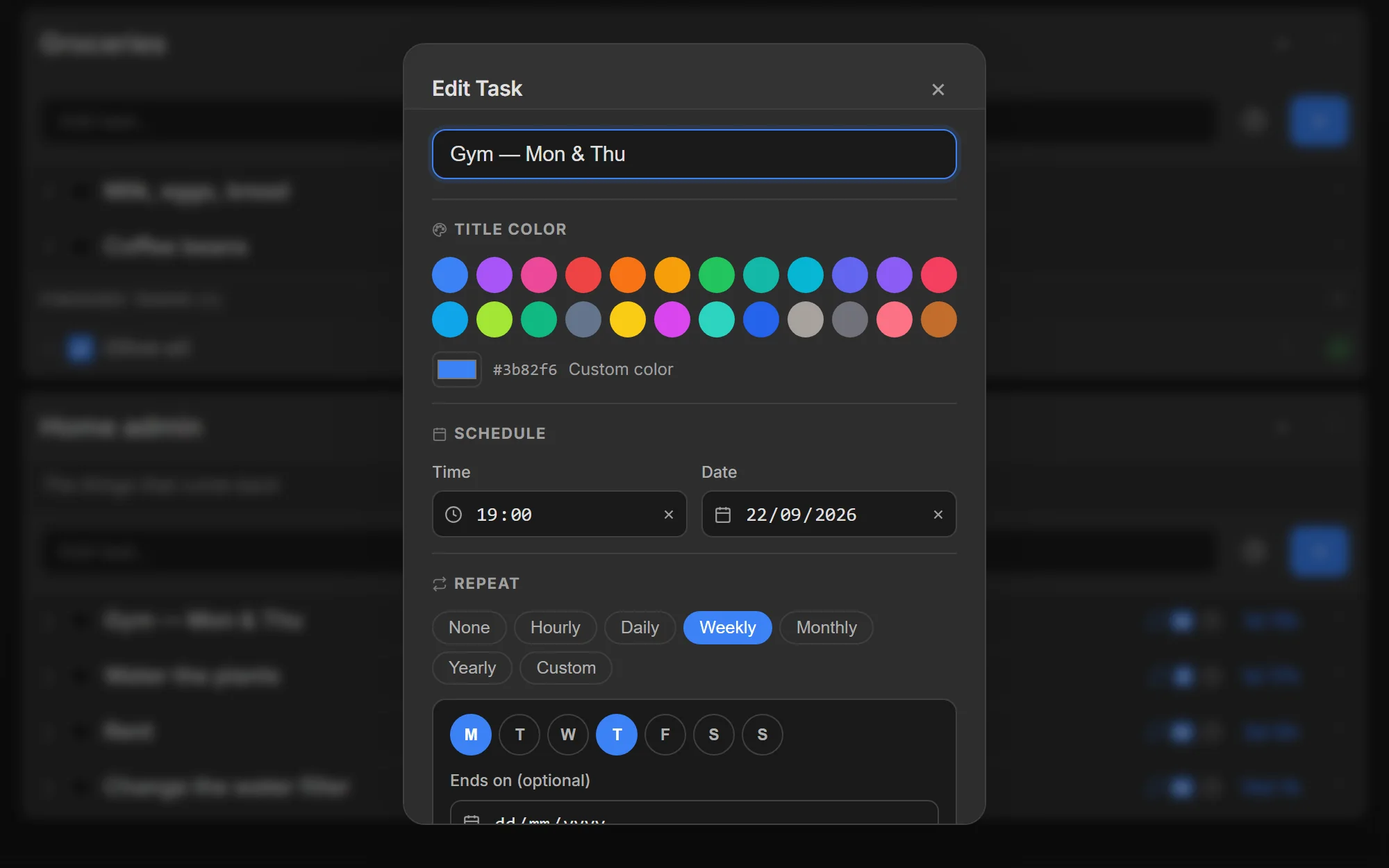
Tasks that schedule themselves
Repeat a task every day, on chosen weekdays or every N days, with an optional end date. Tick it off and the next occurrence is scheduled for you — the series does not stop.
How repeats are scheduled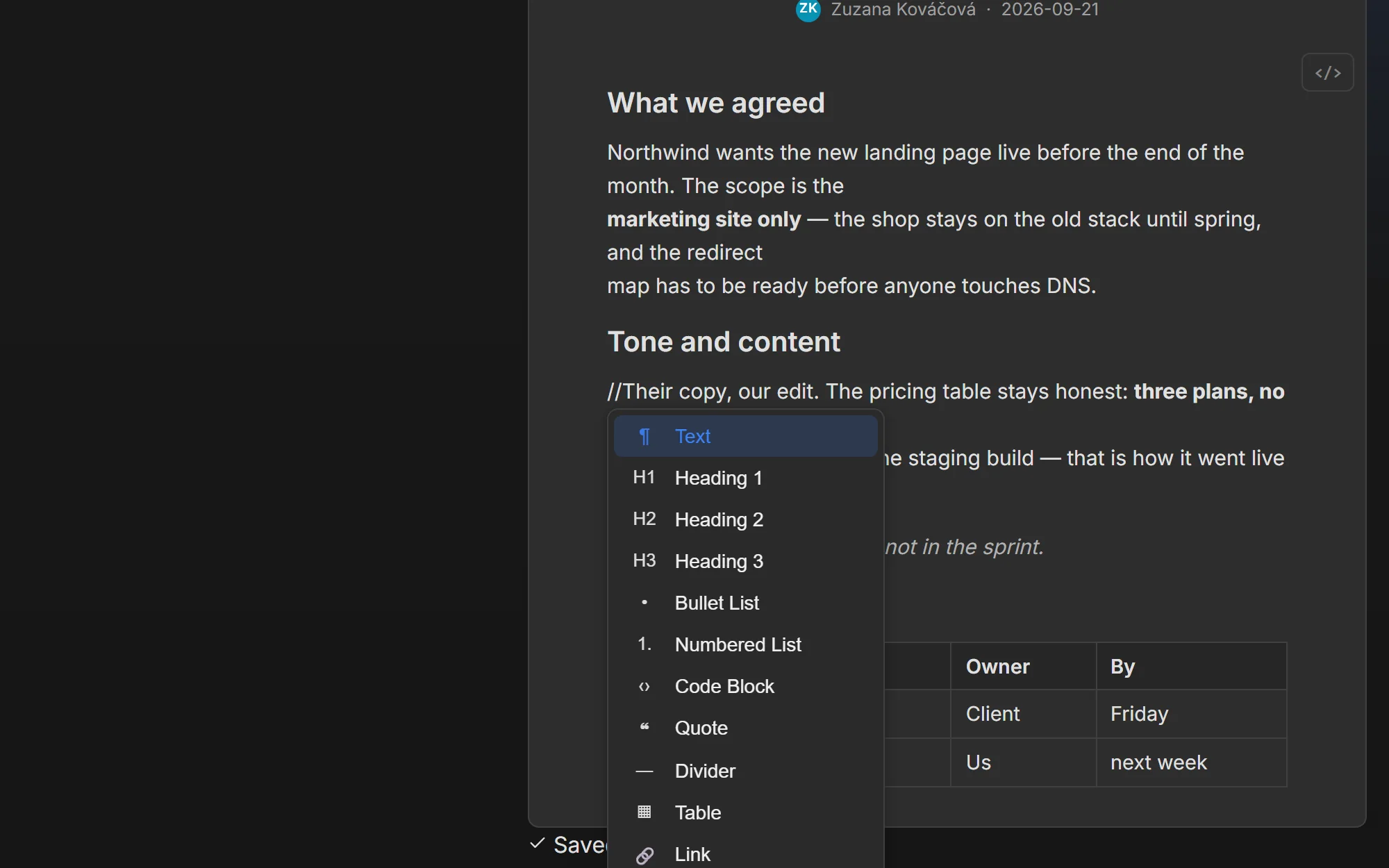
Notes where the work is
Markdown notes with tables and images live in the same workspace as the tasks. Private notes stay yours, locked notes nobody edits, and any earlier version is restorable.
How notes and versions work
Know where the hours wentPremium Plus
Start a timer on a task and stop it when you are done. Tracked time lands per task, per list and per workspace, so a shared board also answers who worked on what.
How time is tracked- Separate workspaces for work, study and home
- Shared workspaces with viewer, editor and moderator roles
- Offline-first, installable on desktop and Android
- REST API v1 with scoped tokens, and a hosted MCP server for AI assistants — no installPremium Plus
- Web push reminders on every deadline
- Dark & light themes with 24 accent colours
- Image and file attachments
- Storage from 100 MB to 25 GB per plan
- Sign in with Google or email
How It Works
Get started in three simple steps
Create Workspaces
Set up different workspaces for work, personal life, hobbies, or anything else you need to organize.
Add Lists & Deadlines
Create lists within each workspace and set countdown timers to stay on top of important deadlines.
Organize & Complete
Add tasks, track progress with visual indicators, and celebrate as you check items off your list.
Built for deadline-driven work
Different jobs, the same problem: something is always due.
Freelancers & consultants
One workspace per client, a timer on every billable task, and a countdown on each delivery date. Tracked time and lists stay together, so reporting is not a second job.
Students & researchers
Assignment deadlines with countdowns, markdown notes for sources and drafts, and a phone app that keeps working in the library basement without signal.
Small teams (2–5 people)
Share one workspace, hand out viewer or editor rights, see who tracked what — without another weekly status meeting.
Simple pricing
Start free, upgrade when you need more workspaces, time tracking or team members.
| Popular | ||||
|---|---|---|---|---|
| Feature | Free Getting started €0 free forever | Premium Solo power users €6/month or €66/year · 1 month free without tax | Premium Plus Time tracking & API €12/month or €132/year · 1 month free without tax | Team 2–5 people €24/month or €264/year · 1 month free without tax |
| Workspaces | 1 | 3 | Unlimited | Unlimited |
| Lists per workspace | 2 | Unlimited | Unlimited | Unlimited |
| Tasks per list | 10 | Unlimited | Unlimited | Unlimited |
| Notes per workspace | 2 | Unlimited | Unlimited | Unlimited |
| Storage | 100 MB | 1 GB | 10 GB | 25 GB |
| Deadline reminders & web push | Included | Included | Included | Included |
| Time tracking & statistics | Not included | Not included | Included | Included |
| Google Calendar integration | Not included | Included | Included | Included |
| Custom themes & 24 accent colours | Included | Included | Included | Included |
| Advanced settings | Not included | Included | Included | Included |
| REST API v1 & MCP server | Not included | Not included | Included | Included |
| Team members | Not included | Not included | Not included | Up to 5 users (owner included) |
| Shares & roles (viewer / editor / moderator) | Not included | Not included | Not included | Included |
Coming soon | Coming soon | Coming soon |
Swipe to compare plans
Frequently asked questions
Pricing, deadlines, offline mode, team sharing and the API — the short answers.
Is Taskr free?
Yes. The free plan includes one workspace with up to 2 lists, 10 tasks per list, 2 notes and 100 MB of storage — no credit card required. Paid plans (€6, €12 and €24 per month) raise the limits and add time tracking, analytics, team collaboration and API access.
How do the countdown timers work?
Give a task or a whole list a due date and Taskr shows a live countdown with colour-coded urgency, so whatever is due next is the first thing you see when you open the board.
Can I create recurring tasks?
Yes. A task can repeat every day, on selected weekdays, or every N days or weeks, with an optional end date. When you complete it, the next occurrence is scheduled automatically.
Does Taskr work offline?
Yes. Taskr is an installable progressive web app: your open workspace, its lists, tasks and notes stay readable without a connection, and the copy on your device is refreshed the next time you are online. Editing needs a connection.
Is there a mobile app?
You can install Taskr from the browser on desktop and Android (the Android build is a native shell around the same app). Everything is stored server-side, so your phone and desktop show the same board.
Can I share a workspace with my team?
On the Team plan you can invite up to 4 people per account (5 users including you) into any number of your workspaces, with viewer, editor, moderator or owner roles. The same person invited to several workspaces only uses one seat.
Does Taskr have an API or an MCP server?
Yes. Premium Plus and Team include REST API v1 with scoped API tokens, plus an MCP server so AI assistants such as Claude or Cursor can read and update your tasks, lists, notes and tracked time.
Can I track time on tasks?
On Premium Plus and Team you can start a timer on any task and then review tracked time per task, per list and per workspace in the statistics views.
Where is my data stored?
Taskr runs on our own servers hosted with Hetzner in the European Union. Your workspaces are not stored in a third-party SaaS backend, and you can export or delete your account data at any time.
Ready to stop missing deadlines?
Create your first workspace in about a minute. The free plan needs no credit card — upgrade only when you need more workspaces, time tracking or team members.